How to Block Instagram Reels on Android
Reels is the part of Instagram engineered to keep you swiping — the short-form video tab Meta copied from TikTok and pushed to the center of the app. Not your feed. Not Stories. Not DMs. The endless vertical scroll is where the time goes.
You can’t disable Reels inside Instagram. Meta won’t build that toggle. Reels drive engagement, engagement drives ads, ads drive revenue. Your compulsive swiping is their business model.
But you can reduce, limit, or degrade the Reels experience on Android.
Method 1: Train the algorithm away from Reels
Long-press on every Reel that appears in your main feed. Tap “Not Interested.” Do this aggressively for a week. Instagram’s algorithm will de-prioritize Reels in your home feed.
This doesn’t remove the dedicated Reels tab. It doesn’t stop Reels from appearing in Explore. It only reduces Reels that appear mixed into your regular feed. Partial solution.
Method 2: Use Instagram in a browser
The mobile website (instagram.com in Chrome) has a less aggressive Reels experience than the app. DMs work. The feed works. Reels are accessible but not shoved at you from every surface.
The browser version is deliberately worse than the app — Meta wants you in the app. That worse experience is the point. The friction of a slower, less polished interface reduces casual scrolling.
You can also use Firefox mobile with uBlock Origin to modify the Instagram web experience, though Instagram frequently breaks third-party modifications.
Method 3: Block Instagram during Reels hours
Most Reels scrolling happens in the evening. Use AppBlock to block Instagram from 8pm to 7am. Keep it accessible during the day for DMs and posting.
Strict Mode prevents disabling the block during the session. You can still access DMs through the web version if needed. This separates the functional use (daytime messaging) from the compulsive use (evening Reels binge).
Method 4: Add friction before Instagram opens
ScreenZen (free) or One Sec add a pause before Instagram opens. A breathing exercise, a countdown, a daily open limit. The pause catches the autopilot “I’ll just check one thing” that turns into a 30-minute Reels session.
The daily open limit is the useful feature here. Set it to 5 opens per day. After 5, ScreenZen shows an extended wait timer. You can still get through, but the friction is high enough that casual opens drop sharply.
Method 5: Break the trance while you’re in Reels
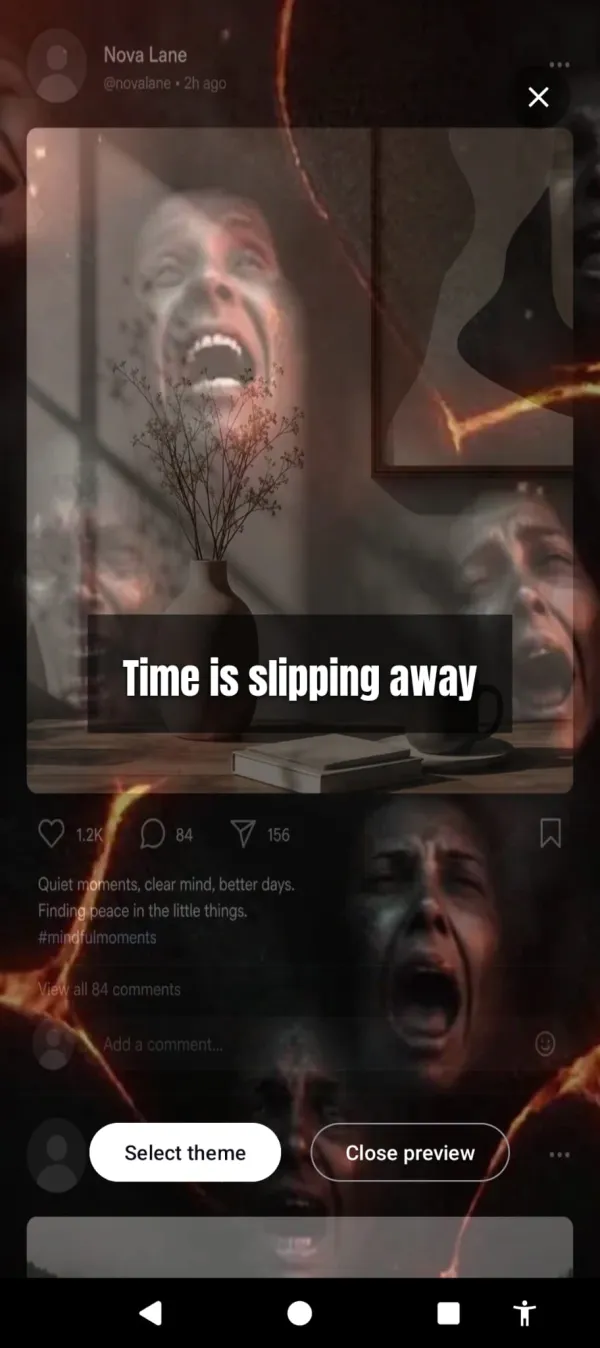
On Android, Arise doesn’t block Instagram or Reels unless you ask it to. Reels are built to put you in a trance, and Arise breaks it with visual reminders. Put Instagram on your list of life-stealing apps (instagram.com too, so the browser trick from Method 2 doesn’t become the new loophole). After a grace period, a reminder appears over it and grows stronger the longer you stay. Hellfire creeps from the edges. Glass cracks across the display. Bugs crawl over whatever you’re watching.
Reels still play. The algorithm still serves content. But the reminder keeps pulling you back to the life waiting outside the screen, and that changes how the swipe feels. You can keep scrolling. But you won’t want to.
Reels still play. The fire just keeps reminding you what they’re taking.
The grace period means opening Instagram for a DM stays clean. The reminder only appears after sustained use. A 2-minute message check is reminder-free. A 30-minute Reels binge is hard to ignore. Put the phone down and the reminder fades away.
Unlike blocking or friction, this approach works during the scroll, not before it. Methods 1-4 try to stop you from entering the Reels tab. This one breaks the trance the longer you stay. Different intervention point, different failure mode.
Which method to use
Never tried anything: Method 1 (train the algorithm) + Method 4 (ScreenZen, free). Low effort, moderate impact.
Tried friction, still binge: Method 3 (AppBlock evening block) for time-based restriction.
Tried everything, Reels still win: Method 5 (Arise). Free to use on Android and iPhone (on iPhone it blocks apps; the visual reminders are Android only). Premium themes, focus mode and Child Lock come with a monthly, yearly or lifetime plan. The Reels still play. Arise is there for the hour you didn’t plan to lose.
Reels weren’t designed for you to watch three and stop. They were designed for you to watch 300 and lose an hour. Whichever method you choose, you’re fighting a feature backed by billions of engineering hours. Pick the one you’ll actually keep using.
Want a tool that does this automatically?
Your phone is built to keep you scrolling. Arise breaks the trance with visual reminders that grow the longer you stay, and it can lock an app when you want a hard stop.
Get Arise on Google Play