Digital Wellbeing Alternative: Because App Timers Are a Joke
Disclosure: Arise is our product. Digital Wellbeing data from Google’s documentation and 9to5Google. Last reviewed: April 2026.
You already have Digital Wellbeing. It came pre-installed on your Android phone the day you bought it. You’ve checked the dashboard. You’ve seen the number — 4h 12min on Instagram yesterday. You winced. You closed the app. You opened Instagram.
That’s the problem.
What Digital Wellbeing actually does well
Credit where it’s due. The data is accurate, the dashboard is clean, and it costs nothing because it’s baked into the operating system. For a tool you didn’t ask for and probably forgot existed, it does a few things right.
- Usage dashboard. Daily screen time, app-by-app breakdown, unlocks, notification counts. The numbers are real and they update in something close to real-time.
- Bedtime Mode. Dims the screen, flips to grayscale, enables Do Not Disturb on a schedule. The grayscale alone removes a lot of the dopamine pull from feed apps. Genuinely useful for sleep hygiene.
- Focus Mode. Pauses a chosen set of apps at once. Better than fiddling with individual timers because you can kill TikTok, Instagram, and YouTube with a single toggle.
- Family Link integration. If you’re managing a kid’s phone, the parental controls hook into Family Link cleanly.
If you’ve never opened Digital Wellbeing, open it. Look at your week. The shock of the actual number is sometimes enough on its own — for about three days. Then the number stops being a shock and starts being a fact you scroll past on your way to checking notifications.
Where Digital Wellbeing breaks
The dashboard is honest. The interventions aren’t.
App timers are a suggestion, not a limit. Set Instagram to 30 minutes. Hit the limit. A polite notification appears with two buttons: “OK” or “Ignore Limit.” The thumb that just spent 30 minutes scrolling Reels is the same thumb that taps “Ignore Limit.” There’s no friction. No cooldown. No password. The button is right there, sized for a half-asleep tap at 11pm. By the time the notification appears, you’re already in flow state. The limit doesn’t survive the dopamine.
Focus Mode requires you to start it. It works fine once active, but it’s opt-in every single time unless you set a schedule. And the schedule is the same trap — you set it on a Sunday afternoon feeling motivated, you wake up Monday with the focus window starting at 9am, and by Wednesday you’ve turned the schedule off because it triggered during a moment you actually wanted the apps.
Bedtime Mode is opt-in-and-forget. The first week you respect the grayscale. The second week you notice you can still scroll in grayscale. The third week you’ve muscle-memoried past the “wind down” screen and you’re back to color Instagram at 1am.
The dashboard is just data. Knowing you spent 4h 12min on Instagram doesn’t reduce the time you spend on Instagram. It just makes you feel worse about it. The number doesn’t intervene. It observes.
Google has barely touched Digital Wellbeing in years. The features that shipped at launch are essentially the features today. There’s a reason for that. Google’s revenue depends on Android engagement — YouTube views, Play Store time, Chrome searches. Building a screen time tool that actually worked would cannibalize the business that funds the tool. So the tool ships, satisfies regulators and press, and never gets stricter.
The “informed but unchanged” problem
There’s a pattern that shows up if you talk to enough people about their phone use. The people who check their screen time dashboard the most are often the people with the highest screen time. The dashboard isn’t reducing their usage. It’s just adding a layer of anxiety on top of it.
This is the gap between awareness and behavior. You can know exactly how many hours you spend on TikTok and keep spending those hours. You can feel guilty about the number and pick the phone back up two minutes later. Awareness without intervention is just guilt with a graph attached.
Digital Wellbeing is built on the assumption that if people just saw the data, they’d change. That assumption is wrong for the same reason food labels didn’t end obesity and warning labels on cigarettes didn’t end smoking until packaging actually got ugly. People don’t change because they learned a fact. They change when the experience itself changes. The cigarette pack covered in a tar-stained lung is the closest analog to what a screen time tool would need to do. Digital Wellbeing shows you a pie chart. The pie chart is not a tar-stained lung.
If you’re still scrolling six hours a day after a year of looking at your usage dashboard, the dashboard isn’t the tool you need. You need something that changes what scrolling feels like, not something that reports what scrolling cost. See our breakdown on how to break phone addiction for why intervention-based approaches survive past the first week.
Digital Wellbeing vs Arise
| Digital Wellbeing | Arise | |
|---|---|---|
| Cost | Free (built into Android) | Free; premium $5.99/month, $29.99/yr or $98.99 lifetime |
| Approach | Inform you | Break the trance |
| Bypass | One tap (“Ignore Limit”) | Nothing to bypass unless you ask it to block |
| Requires willpower | Yes — to not tap dismiss | No — the reminder just appears |
| Visual feedback | A number in a dashboard | Hellfire creeping across the screen |
| Schedule-based | Yes (timers, bedtime) | No (responds to actual usage) |
| Behavior change mechanism | Data and notifications | Visual reminders during use |
| What you do to stop it | Use less of an app for a day | Put the phone down for a few minutes |
How Arise does it differently
Arise isn’t just a tracker. It does show you the numbers — today’s usage, a 30-day trend against your usual, the time you’ve saved — but the numbers aren’t the intervention. It doesn’t send you a notification at 30 minutes saying “hey, careful.”
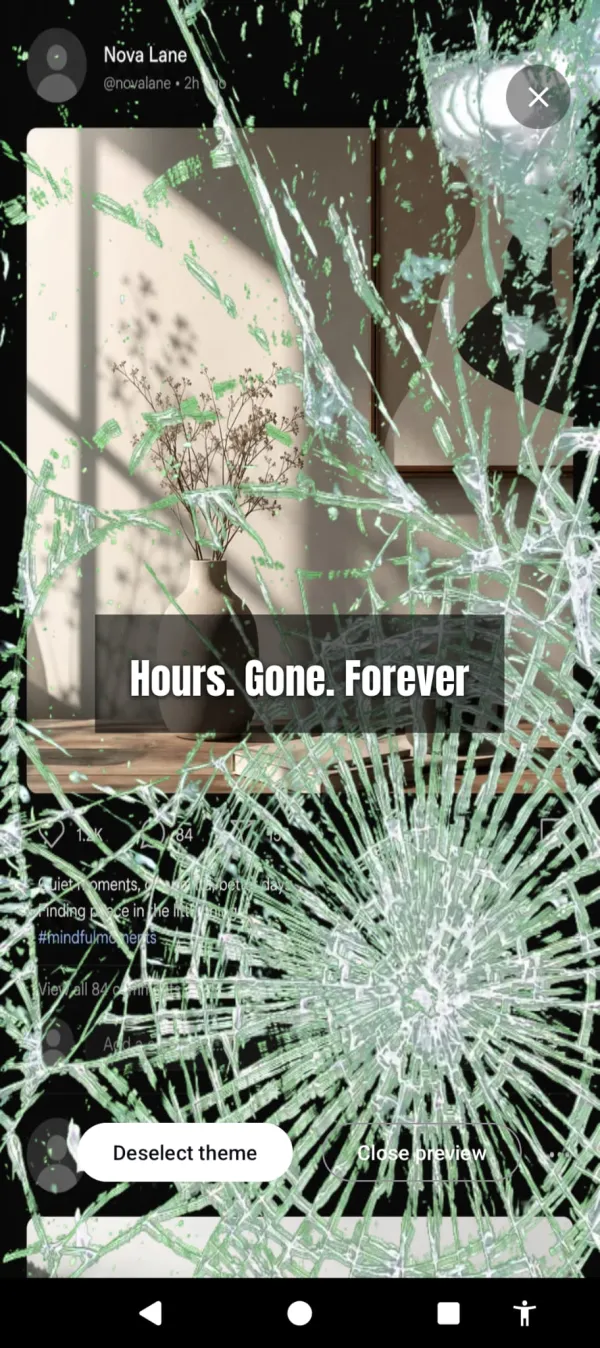
What it does is this. Your phone is designed to hook you, and the feed puts you in a trance that steals hours at a time. Arise breaks the trance. You pick your life-stealing apps and websites. After a configurable grace period — say, 30 minutes a day in those apps — a visual reminder appears over them. Flames licking up from the bottom. Glass cracking across the periphery. Bugs skittering inward. Newer themes fill more of the screen as the minutes pass: frost spreading over the glass, water rising, autumn leaves piling up. The longer you stay, the stronger it grows. On Android, nothing is blocked unless you ask it to. Every tap still goes through. The reminder just keeps pulling you back to the life outside the screen.
Glass cracking across your feed. It just gets harder to lose yourself in.
There’s no “Ignore Limit” button because there’s no limit to ignore. The reminder isn’t asking your permission. It’s not a notification you can swipe away. It’s the screen itself, changing. The only way to make it fade is to put the phone down for a few minutes. Pick it back up and it resumes wherever it left off.
If hellfire isn’t your style, the beautiful themes pull instead of push. Aurora borealis or golden sunlight drifts across the screen, or butterflies and wildflowers slowly fill it, with text like “the world misses you” or “someone is smiling nearby.” Same mechanic — the reminder grows with your usage — but the pull is gentle instead of harsh. Some people respond to bugs on their screen. Others respond to golden light that reminds them it’s a nice day outside.
The intervention is automatic, scaled to your behavior, and not negotiable. That’s the whole difference. Digital Wellbeing tells you what you did. Arise changes what doing it feels like. For more on this approach, see our guides on setting a real screen time limit and the broader apps to manage screen time landscape.
Honest take
If you’ve never tried Digital Wellbeing, try it before you pay for anything. It’s free, it’s already installed, and the dashboard alone might be enough of a wake-up call to fix things on willpower. Some people genuinely respond to data. If you’re one of them, save your money.
But if you’ve been looking at your screen time numbers for months and they haven’t budged — if “informed but unchanged” describes you — the tool that works isn’t a better dashboard. It’s a different category of tool. One that intervenes instead of reports. One you can’t dismiss with a thumb tap.
That’s what Arise is. A visual reminder that breaks the trance when you’ve been in your life-stealing apps too long. No timer to override. No notification to ignore. Just a screen that visibly reflects what your phone addiction is actually costing you, in real time, while you’re doing it.
Try Arise on the Play Store. It’s free to use. Premium themes, focus mode and Child Lock come with a monthly, yearly or lifetime plan. Google isn’t going to fix Digital Wellbeing — they have no reason to. So fix it yourself.
Ready to try a different approach?
Your phone is built to keep you scrolling. Arise breaks the trance with visual reminders that grow the longer you stay, and it can lock an app when you want a hard stop.
Get Arise on Google Play