Grayscale Phone: Does Black and White Actually Work?
Turn your phone black and white. Suddenly Instagram looks like a newspaper. TikTok thumbnails are gray blobs. The colorful dopamine triggers disappear. You use your phone less because it looks boring.
That’s the theory. It went viral on TikTok (ironic) and has been recommended by every digital wellness article since 2018. Even Google built it into Digital Wellbeing’s Bedtime Mode. The advice is everywhere: grayscale mode reduces phone addiction.
Does it? For about two weeks.
How to enable grayscale on Android
Bedtime Mode (easiest): Settings > Digital Wellbeing > Bedtime Mode. Enable grayscale as part of your bedtime routine. It activates on schedule and turns off in the morning.
Developer Options (always-on): Settings > About Phone > tap Build Number 7 times > back to Settings > Developer Options > Simulate Color Space > Monochromacy. This makes your entire phone grayscale all the time.
Quick Settings tile: Some Android versions let you add a grayscale toggle to your pull-down Quick Settings panel for easy switching.
What grayscale actually does
The premise is sound. Color is how apps grab you. Bright icons. Colorful thumbnails. Red notification badges that scream “open me.” Remove the color and those triggers weaken. Instagram goes from bright gradient to gray square. TikTok thumbnails lose their punch. The red badge becomes a gray dot you can actually ignore.
The first few days of grayscale feel different. Your phone looks muted. Less interesting. You pick it up, see gray, put it back down. That’s real — for a while.
Why grayscale stops working
Your brain adapts. That’s what brains do. Within 7-14 days, gray becomes the new normal. The muted phone doesn’t feel boring anymore because your visual system has recalibrated. The dopamine response to content doesn’t depend on color — it depends on novelty, surprise, and social validation. All three survive grayscale.
A funny dog video is still funny in black and white. A comment notification still triggers social validation. An outrage post still triggers emotional engagement. The content is the hook, not the color. Grayscale removes the paint from the hook. The hook is still there.
There’s also the practical problem. Grayscale makes your entire phone worse, not just the addictive parts:
- Photos look dead. Checking photos someone sent you is miserable in grayscale.
- Maps are nearly unusable. Traffic colors, route highlights, transit lines — all invisible.
- Work apps become harder to parse. Spreadsheets, calendars, design tools all rely on color coding.
- You start toggling. Turn grayscale off to check a photo, forget to turn it back on, and you’re back to full color for the rest of the evening.
The toggling is what kills it. Grayscale works only if it’s always on. The moment you toggle it off for a “legitimate” reason, the barrier drops. And there are legitimate reasons to toggle it off multiple times a day.
Grayscale as part of a stack
Grayscale isn’t useless. It’s just insufficient on its own. Where it works best is as one component of a larger strategy.
Grayscale + phone in another room at night is more effective than either alone. The grayscale reduces daytime pickups. The physical separation handles nighttime scrolling when grayscale’s effect has worn off.
Grayscale + minimalist launcher doubles the visual reduction. A text-only launcher with grayscale mode creates a phone that genuinely looks uninviting. Both adaptations fade over time, but together they last longer.
Grayscale + Bedtime Mode scheduling targets the time when scrolling is most harmful. Full-color phone during the day for functional use. Grayscale from 9pm to 7am when you’re most vulnerable to the scroll. Digital Wellbeing handles this automatically.
Grayscale vs visual reminders
Grayscale makes your phone boring. Arise breaks the trance. The difference matters.
Boredom is something your brain adapts to. You get used to gray. You stop noticing it. Within two weeks, your grayscale phone feels normal and the content is just as compelling.
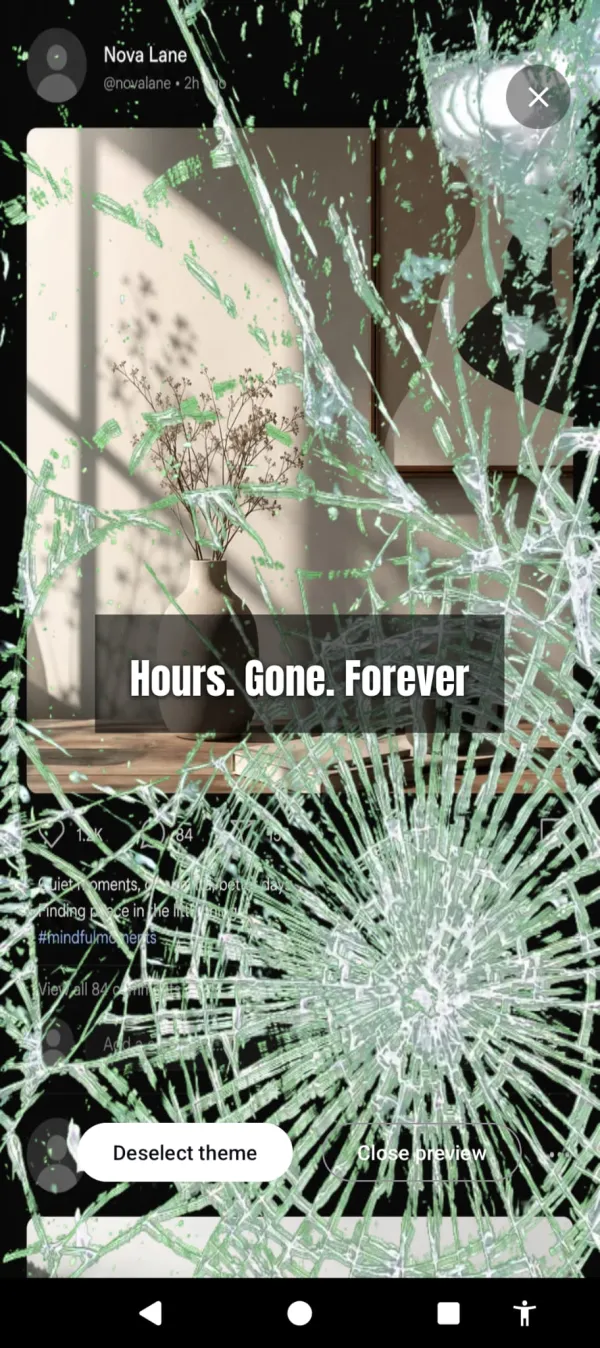
A reminder that keeps growing is harder to tune out. You pick your life-stealing apps, and after a grace period, a visual reminder appears over them. Hellfire creeping from the edges. Glass cracking across the display. Bugs crawling over your feed. These themes make the scroll feel wrong in a way gray never does. Or pick the beautiful ones — aurora, sunlight, butterflies drifting in — that remind you of the world you’re missing. You normalize gray. You don’t normalize insects crawling over your feed.
Grayscale is also static — your phone looks the same whether you’ve used it for 5 minutes or 5 hours. Arise’s reminder grows stronger the longer you stay. At 5 minutes past your grace period, it’s subtle. At 60 minutes, it’s hard to ignore. Newer themes fill more of the screen as the minutes pass — frost spreading over the glass, water rising from the bottom — and keep pulling you back to the life waiting outside the screen. Put the phone down and it fades away.
And unlike grayscale, Arise doesn’t make the useful parts of your phone worse. Maps still show color. Photos still look normal. The reminder only appears in the apps and websites you put on your list, and only after your grace period. A quick 2-minute check stays clean. A 90-minute scroll session doesn’t. Grayscale dims everything equally. Arise goes after the scroll, not the device.
Grayscale stays flat. This cracks wider the longer you scroll.
Should you try grayscale?
Yes, as a starting point. It’s free, takes 30 seconds to enable, and gives you a concrete experience of what “making your phone less appealing” feels like. If grayscale reduces your usage and the effect lasts beyond two weeks, you might not need anything else.
If the effect fades (it probably will), you’ve learned something important: your phone addiction isn’t about how the phone looks. It’s about what the phone delivers. That realization points you toward tools that change the delivery experience, not just the visual wrapper.
Arise is free to use on Android and iPhone (on iPhone it blocks apps; the visual reminders are Android only). Premium themes, focus mode and Child Lock come with a monthly, yearly or lifetime plan. Think of it as grayscale that doesn’t wear off: the reminder keeps changing and growing, so your brain never gets used to it.
Grayscale was the first step. The next one actually sticks.
Take back your life from your phone
Your phone is built to keep you scrolling. Arise breaks the trance with visual reminders that grow the longer you stay, and it can lock an app when you want a hard stop.
Get Arise on Google Play