How to Block YouTube Shorts on Android (Every Method)
YouTube Shorts crossed 70 billion daily views in 2025. That’s billion, with a B. Every day. The feature that started as TikTok’s clone has become YouTube’s primary engagement driver, and the algorithm is tuned to keep you swiping indefinitely.
You opened YouTube to watch a tutorial. The Shorts shelf was right there. You tapped one. That was 40 minutes ago. Now you’re watching a hamster eat a tiny burrito and you can’t explain how you got here. That blackout-style loss of 40 minutes is the doomscrolling pattern in microcosm.
Here’s every method to block, hide, or limit YouTube Shorts on Android. Each one works differently and breaks differently.
Method 1: YouTube app settings
YouTube doesn’t have a “disable Shorts” toggle. They’re not going to build one. Shorts drive engagement metrics, and engagement metrics drive ad revenue. Google has no incentive to let you turn off the most engaging part of their app.
What you can do in settings:
- Tap “Not Interested” on Shorts. Long-press a Short, tap “Not Interested.” This tells the algorithm you don’t want that specific type of content. It doesn’t remove Shorts. It adjusts which ones you see. After doing this to 50+ Shorts, the content shifts but the format stays.
- Clear watch history for Shorts. YouTube Settings > History & Privacy > Clear Watch History. This resets the algorithm’s profile for what Shorts to show you. It’ll start serving generic content instead of your personalized feed. Less addictive for a few days, then it relearns you.
Neither of these removes Shorts from the app. YouTube is not going to let you block their highest-engagement feature through settings. That’s not a conspiracy; it’s their business model.
Method 2: Use YouTube in a browser
Open YouTube in Chrome (or Firefox or Brave) instead of the YouTube app. The mobile website doesn’t push Shorts as aggressively as the app. You can also use an ad-blocker extension in Firefox mobile (uBlock Origin) that can be configured to hide the Shorts shelf entirely. If you want to go further, a proper site blocker can kill youtube.com during work hours too.
What’s good: You can block Shorts completely with the right browser extension. The mobile web experience is also slower and less polished, which adds natural friction.
What breaks: The browser experience is worse for everything, not just Shorts. No picture-in-picture. No background play. No offline downloads. Notifications don’t work the same way. You’re degrading the useful parts of YouTube to block the addictive parts.
Method 3: Third-party apps
Several apps specifically target YouTube Shorts:
ReVanced/NewPipe — Modified YouTube clients that let you disable Shorts entirely. ReVanced patches the official YouTube app to remove the Shorts shelf. NewPipe is an open-source alternative client without Shorts. Both are unofficial, not on the Play Store, and require sideloading. They work well but break when YouTube pushes updates, and using modified apps may violate YouTube’s terms of service.
AppBlock with URL blocking — You can block the YouTube app during specific hours while keeping the browser version available (without Shorts). Or block YouTube entirely during focus time. Strict Mode prevents bypass. $30/year. For the broader comparison of which app blocker on Android is worth installing, the answer depends on whether you’ve already disabled three others.
Freedom with YouTube blocked — Blocks YouTube across all browsers and apps simultaneously via VPN. $40/year. The nuclear option when you need YouTube completely gone.
Method 4: Block YouTube entirely (and use alternatives for long-form)
If Shorts are the problem but you still need YouTube for tutorials, music, or podcasts, consider this split:
- Block the YouTube app and mobile website
- Use YouTube Music for audio content
- Bookmark specific channels and access them through a browser with Shorts hidden
- Use a podcast app for YouTube podcasts that are available as RSS feeds
This is fiddly. It requires maintaining a system instead of just opening an app. For some people, the friction of the system is the point — it prevents casual Shorts scrolling while preserving intentional use.
Method 5: Don’t block Shorts. Break the trance.
Every method above either degrades the YouTube experience for everything or requires maintaining a workaround that breaks when YouTube updates. There’s a different approach: keep YouTube fully functional and break the trance the Shorts feed puts you in.
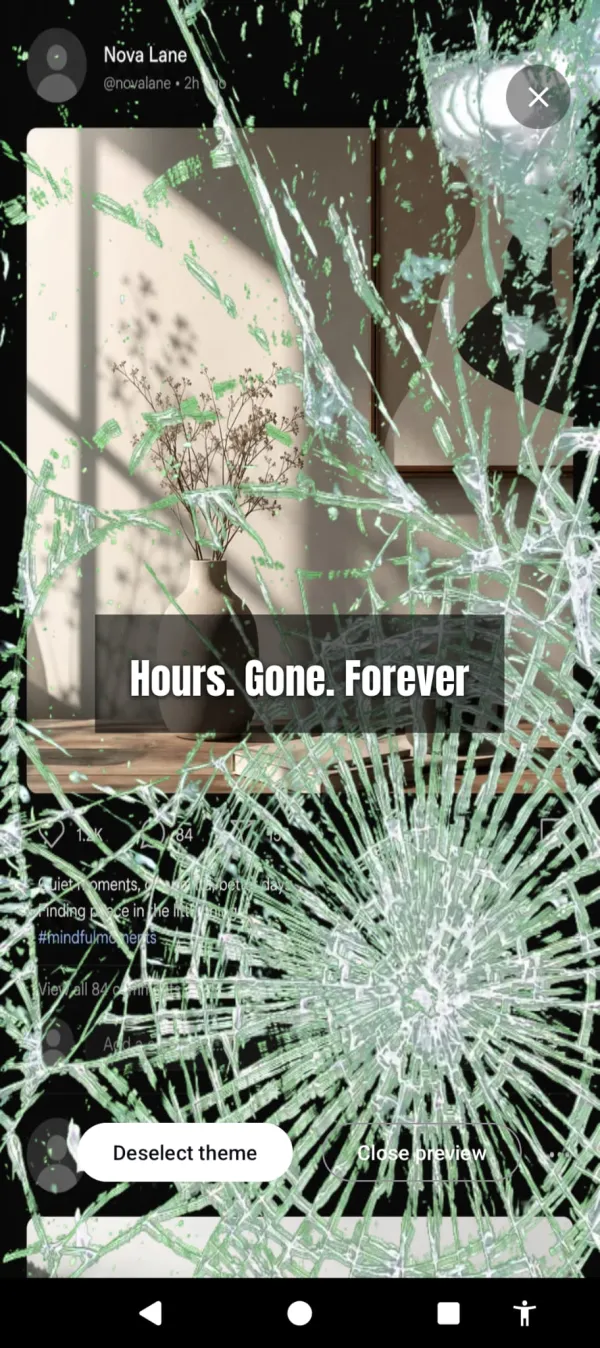
On Android, Arise doesn’t block YouTube or any other app unless you ask it to. Put YouTube on your list of life-stealing apps (youtube.com too, so the browser route from Method 2 is covered). After a grace period, a visual reminder appears over it and grows stronger the longer you stay. Glass cracking. Bugs crawling over whatever you’re watching. Hellfire creeping in from the edges. Newer themes fill more of the screen as the minutes pass, like frost spreading over the glass. The content still plays. The Shorts still loop. But the reminder keeps pulling you back to the life waiting outside the screen.
The Short still loops. The cracks keep showing you what it’s taking.
You can still open YouTube. You can still watch a 10-minute tutorial (the grace period covers that). But when you tap into Shorts and 40 minutes vanish, the reminder has grown hard to ignore. You don’t need to block Shorts. You need the trance to break once the grace period is up. You can keep scrolling. But you won’t want to.
The advantage over blocking: nothing breaks. YouTube works normally. Playlists, subscriptions, comments, long-form videos — all fine. The reminder only appears once your time in your life-stealing apps crosses the grace period. A quick search doesn’t trigger it. A 40-minute Shorts binge does. Put the phone down and it fades away.
Session-based tracking means you can watch a 20-minute video, put your phone down, and come back with a clean screen. The 3:1 rule (3 minutes off = 1 minute forgiven) rewards breaks. The phone actively encourages you to stop and come back instead of consuming continuously.
Which method to pick
If you never want to see Shorts again: ReVanced or NewPipe. Sideload, accept the tradeoffs.
If you need Shorts blocked during work hours: AppBlock with YouTube on the blocklist. Enable Strict Mode.
If you want YouTube to keep working but the Shorts binges to stop: Arise. Free to use on Android and iPhone (on iPhone it blocks apps; the visual reminders are Android only). Premium themes, focus mode and Child Lock come with a monthly, yearly or lifetime plan. Doesn’t touch YouTube’s functionality. It’s there for the Shorts binge, not the tutorial.
YouTube built Shorts to keep you swiping. 70 billion views a day proves it works. Whichever method you choose, you’re fighting a feature backed by billions of dollars of optimization. Pick the approach you’ll actually sustain, not the one that sounds most dramatic. Shorts is just one face of social media addiction — block it without addressing the rest and the pull moves to Reels.
Want a tool that does this automatically?
Your phone is built to keep you scrolling. Arise breaks the trance with visual reminders that grow the longer you stay, and it can lock an app when you want a hard stop.
Get Arise on Google Play