How to Stop Scrolling on Your Phone (For Real)
You’ve said it to yourself. “I need to stop scrolling.” You’ve said it while scrolling. You said it 20 minutes ago and you’re still here. The intention doesn’t translate to action because scrolling isn’t a choice you’re making. It’s a behavior loop running below conscious thought.
Your thumb swipes before your brain decides. That’s not laziness. That’s conditioning. The apps you’re scrolling through have been refined over a decade by teams of engineers whose explicit goal is to keep you swiping. You’re not failing at self-control. You’re losing to a system designed to beat self-control. The full anatomy of this loop lives in our piece on doomscrolling — what it is, why it works, and why willpower is the wrong tool.
Why “just stop” doesn’t work
The scroll loop works like a slot machine. Variable-ratio reinforcement: most swipes give you nothing interesting, but every 10th or 15th swipe delivers something that hits. A funny video. An outrage post. A friend’s update. Your dopamine system registers those unpredictable rewards and keeps your thumb moving because the next one might be good.
Telling yourself to stop is like telling yourself to stop pulling the lever on a slot machine that pays out every 15 pulls. You know you should stop. Your reward system disagrees. The reward system wins because it doesn’t need your permission to operate. This is phone addiction operating beneath your conscious decision-making — by the time you “decide” to keep scrolling, the decision is already made.
A 2025 study on compulsive phone use confirmed this: the scrolling behavior persists even when users report wanting to stop. The gap between intention and action is neurological, not motivational.
What slows the scroll
Remove the entry point. Move social media apps off your home screen. Put them in a folder on the third screen. You won’t stop scrolling once you’re in the app. But adding two extra taps before you get there catches some of the autopilot opens. Not all. Some.
Add friction at the door. ScreenZen (free) inserts a pause before distracting apps open. A countdown. A “what are you here for?” prompt. The pause breaks the autopilot pattern. You still open the app sometimes. But the mindless opens drop.
Set a physical boundary. Phone in a different room during dinner. Phone charges in the kitchen, not the bedroom. You won’t walk to the kitchen to scroll. You will reach to your nightstand. Distance works because it converts an unconscious behavior (reaching for the phone) into a conscious decision (getting up and walking).
Delete the worst offender for one week. Not all of them. The one app that eats the most time. Check your screen time stats. Delete that one for 7 days. You’ll survive. If you reinstall it after the week, you’ll have 7 days of data showing you what life without it looks like. Most people find their worst offender is one of the big social media addiction candidates — TikTok, Instagram, or YouTube.
What stops the scroll mid-session
The approaches above target the moment before you start scrolling. They do nothing once you’re 40 minutes deep. The session has already started. The dopamine loop is engaged. Your conscious brain checked out at minute 3.
This is the gap most tools miss. App blockers fire at the door. Friction apps fire at the door. Timers fire at a scheduled moment. Nothing changes the experience of the scroll itself. The cognitive consequence of those missed minutes — what people are calling brain rot — builds entirely inside the session the tools ignore.
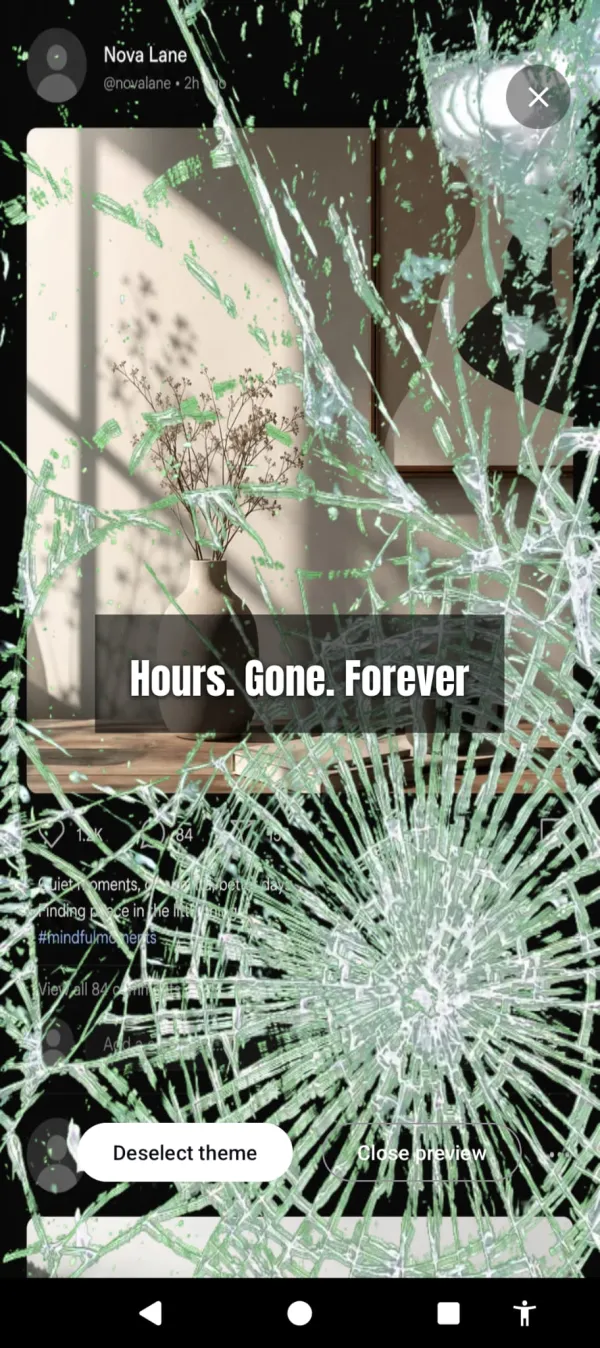
Arise targets the session. Your phone is designed to hook you, and the feed puts you in a trance. Arise breaks it. You pick your life-stealing apps, and after a grace period a visual reminder appears over them and grows stronger the longer you stay. Crawling insects. Glass fracturing across your feed. Frost spreading over the screen. The content is still there. The scroll still works. But the reminder pulls you back to the life outside the screen, and that changes how the scrolling feels.
You don’t decide to stop. You just stop wanting to keep going. At minute 10, the reminder is subtle. At minute 30, it’s hard to miss. At minute 60, it’s impossible to ignore. Most people put the phone down before they reach 60.
Minute 1 it’s subtle. Minute 30 the glass is splitting across your feed.
Session-based tracking means the moment you put the phone down, the reminder starts to fade. Three minutes off forgives one minute on. The phone rewards breaks. Pick it back up and it resumes where it left off.
It doesn’t only push with dread. Pick the aurora or sunlight themes and the feed fills with light instead — pulled toward what’s off the phone rather than shoved off it. And a streak rewards every day you stay under your limit, so stopping the scroll starts to add up to something.
The scroll isn’t the problem
Scrolling for 5 minutes to check on friends is fine. Scrolling for 90 minutes while your dinner gets cold is the problem. The difference between the two isn’t willpower. It’s whether anything in your environment signals that you’ve been on too long.
Your phone has no signal. It looks the same at minute 1 and minute 90. It’s designed that way. The infinite scroll has no bottom. No endpoint. No visual change that says “you’ve been here a while.”
Arise adds that signal. It’s free to use on Android and iPhone (on iPhone it blocks apps; the visual reminders are Android only). Premium themes, focus mode and Child Lock come with a monthly, yearly or lifetime plan. The scroll still works. It just stops feeling like the scroll is worth it. For the longer breakdown of seven approaches that actually work, read how to stop doomscrolling.
Want a tool that does this automatically?
Your phone is built to keep you scrolling. Arise breaks the trance with visual reminders that grow the longer you stay, and it can lock an app when you want a hard stop.
Get Arise on Google Play