Freedom App Alternative: Same Goal, Different Approach
Disclosure: Arise is our product. Freedom data from their website and Play Store listing. Last reviewed: April 2026.
Freedom has been around for over a decade. It’s the grandfather of cross-device blockers — Android, iOS, Mac, Windows, Chrome, Linux, all running off one synced session. Block at 9am on your laptop, the block lives on your Android phone too. $39.99 a year or $199 once. A real piece of software with a real track record.
It works if you stay subscribed and stay inside the model. You’re here because one of those things stopped being true.
Maybe the trial ended and the renewal email arrived. Maybe the VPN keeps fighting your work setup. Maybe Locked Mode broke your day and you cancelled the next session out of spite. Maybe you bought lifetime three years ago and still scroll TikTok every night because Freedom only stops the apps you remembered to add to the list.
What Freedom does well
Credit where it’s owed. Freedom isn’t a half-baked app pretending to be a focus tool. It actually does the thing it sells.
Cross-device sync is the real killer feature. Start a session on your Mac, it follows you to your phone. No other app in this category covers six platforms with one session. If your scrolling moves between devices — laptop at work, phone at home, iPad in bed — Freedom blocks all three at once. Most competitors lock one screen and shrug at the rest.
Locked Mode is hard to bypass. Once a session starts with Locked Mode on, you cannot end it early. No “just five minutes,” no settings backdoor. AppBlock has the same idea with Strict Mode. Freedom’s version is the older, more polished one.
Preset blocklists save the setup work. Social media, news, shopping, adult sites — curated lists ship in the app so you’re not adding URLs one by one. Block-all-except mode flips it: shut down the entire internet and whitelist only what you need. Brutal but effective for deep work.
Brain.fm focus sounds come with the subscription. Nice if you work to background audio.
For the broader category, our app blocker for Android and site blocker breakdowns cover where each tool fits.
Where Freedom breaks
The pitch is great. The mobile reality is messier than the marketing suggests.
VPN-based blocking eats battery. Freedom routes traffic through a local VPN to filter what your phone can reach. That VPN runs the whole session. On Android, persistent VPNs are a known drain — radio stays awake, packets get inspected, indicator pinned. A few hours of focus mode warms the phone.
One VPN at a time. Android only allows a single active VPN. If your job needs a corporate VPN, or you run a privacy VPN like Mullvad or Proton, Freedom either won’t start or kicks the other one off. The OS owns that slot.
The Android escape hatch. Locked Mode stops you cancelling the session inside the app. It doesn’t stop you opening Android Settings, finding the VPN entry, and tapping disconnect. Two taps. Session bypassed. The block is enforced by the VPN being on — turn the VPN off, blocking stops. Reddit threads about this go back years.
No permanent free tier. Seven days, then you pay or you’re out. Fine for software with clear ROI, less fine for a habit tool you use sporadically. ScreenZen is free forever. one sec is freemium. Most of the friction-based screen time apps give you something for nothing. Freedom doesn’t.
$40/year forever. $199 lifetime softens it, but it’s the priciest base subscription in the category outside of Opal. You’re paying yearly to stop yourself doing something you didn’t want to do anyway. A lot of people churn after the first renewal.
Blocking is binary. A site is blocked or it isn’t. No warning you’re about to hit hour three. No signal during the scroll. When the session ends, the block snaps off. A lot of people end a Freedom session and immediately open Instagram — the exact thing they were avoiding. The block was the only friction, and now it’s gone.
Freedom vs Arise at a glance
| Freedom | Arise | |
|---|---|---|
| Approach | VPN-based blocking | Visual reminders that break the trance |
| Platforms | Android, iOS, Mac, Windows, Chrome, Linux | Android, iPhone (iPhone: blocking only) |
| VPN required | Yes | No |
| Price | $39.99/year or $199 lifetime | Free; premium $5.99/month, $29.99/year or $98.99 lifetime |
| Cross-device sync | Yes | No |
| Free trial | 7 days | Not needed (free to use) |
| Works during the scroll | No — only at session boundaries | Yes — the reminder grows the longer you stay |
| Can be bypassed | Toggle VPN off in Android settings | Uninstall the app |
| Battery cost | VPN runs the whole session | Nothing on screen until your grace period is up |
| Setup per use | Start a session, pick a list, set duration | Set it once, runs in the background |
How Arise handles it instead
Different paradigm. On Android, Arise doesn’t block anything unless you ask it to. You pick your life-stealing apps and websites once. There is no session to start. There is no VPN.
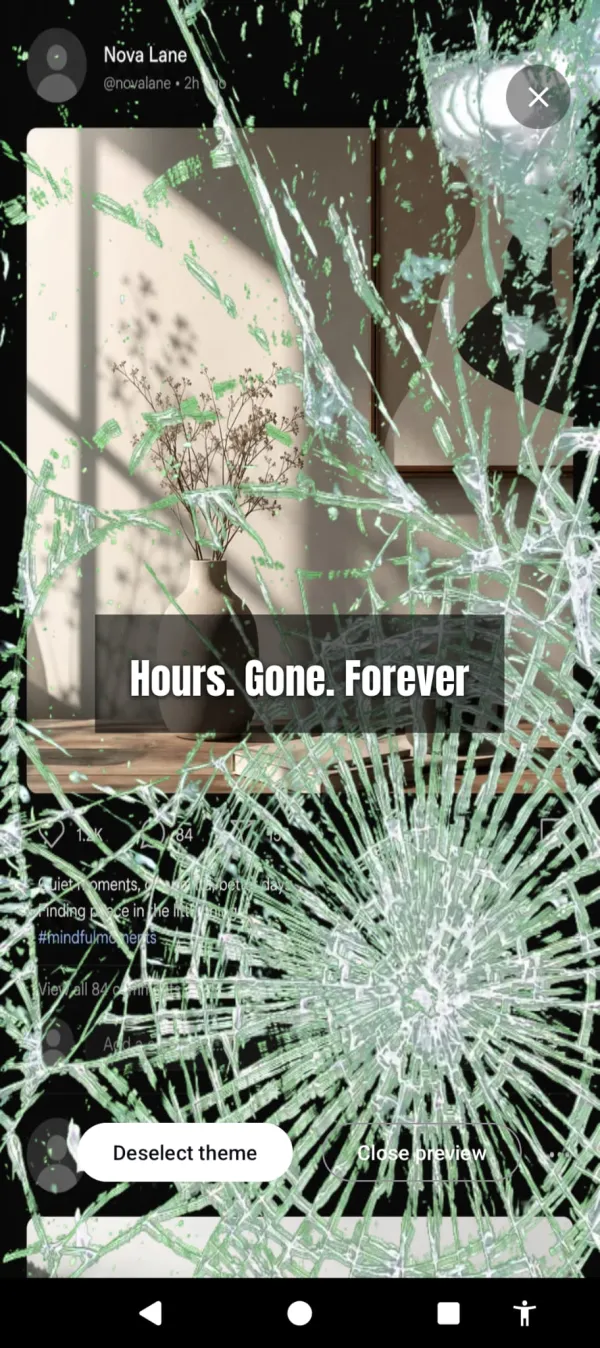
Your phone is designed to hook you, and the feeds put you in a trance. Arise breaks it. You get a grace period to use your life-stealing apps guilt-free — default 60 minutes for daily tracking, 15 minutes for per-session tracking. After that, a visual reminder appears over them and grows stronger the longer you stay. Flames licking the sides. Bugs crawling across the bezel. Glass cracking. Newer themes fill more of the screen as the minutes pass: frost spreading over the glass, thorny brambles closing in. Themes like these make the scroll feel wrong. Aurora and sunlight remind you of the world you’re missing. Put the phone down and it fades away.
Stay too long and the glass gives out. Hours. Gone. Forever.
No VPN. No interference with your work VPN, your privacy VPN, your tethering, your hotspot. Battery cost is the cost of drawing the reminder on screen — much lighter than routing every packet through a filter.
On Android, nothing is blocked unless you ask it to. Every tap goes through. Scroll all night if you want. The reminder just grows while you do, pulling you back to the life waiting outside the screen. That changes the choice from “the app won’t let me” to “I don’t want to keep going.” For a lot of people that second framing actually sticks, where the first one teaches them how to disable the blocker. You can keep scrolling. But you won’t want to.
And it keeps one number pointed the right way: a streak for the days you stayed under your limit, which climbs when you use the phone less.
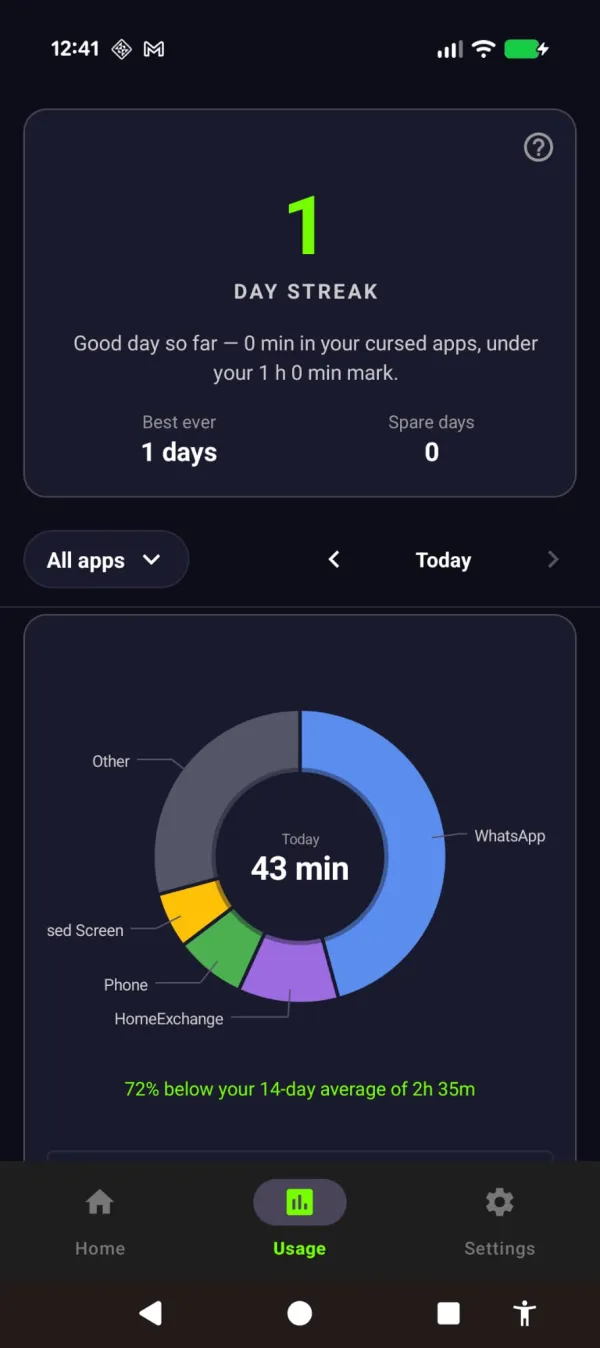
The streak grows the day you stay off — 72% under your usual.
If you want the deeper case for why breaking the trance outperforms binary blocking, the phone addiction and screen time write-ups go further on the mechanism.
Honest tradeoffs
This isn’t a Freedom replacement on every axis. A few places Freedom still wins:
- Cross-device. Arise is phone only. No desktop version. If you scroll equally on your phone and your Mac, Freedom covers both. We don’t.
- Hard blocking. If you have a deadline in four hours and you know you’ll cave, a Locked Mode session is the right tool. The reminder won’t physically stop you. It will only keep pulling you back to the life outside the screen.
- Schedules. Freedom has rich session scheduling — recurring blocks, advance scheduling, calendar-style focus windows. Arise’s rules set how long you get and on which days. Simpler, less control.
- Desktop work. Most of Freedom’s polish is on Mac and Windows. For laptop-heavy workflows, that’s where it shines.
If those are your needs, keep Freedom. The cross-device coverage genuinely has no peer at this price point, and Locked Mode does what it says.
Where Arise wins
If your problem lives on your phone, here’s the case:
- Free to use. Premium is $98.99 lifetime, or $29.99/year. The lifetime unlock is about half of Freedom’s $199, and the annual plan undercuts Freedom’s $39.99. Buy once and the yearly renewal email stops.
- No VPN conflict. Run your work VPN, your privacy VPN, whatever you want. Arise draws its reminder on screen and stays off the network layer.
- Works during the scroll, not just at the boundary. The intervention isn’t “you can’t open this app.” It’s “you’ve been in Instagram for 90 minutes and there are flames around the edge of your screen now.”
- Nothing to bypass (unless you’ve asked it to block). There’s no session to cancel, no VPN to disable, no Locked Mode to wait out. The only way to stop the reminder is to put the phone down. Which is the actual goal.
- No accounts, no sync. Your list of apps and websites stays on your phone. Nothing to log into.
The pitch isn’t that Arise does what Freedom does, cheaper. It does something different. Freedom builds a wall around the apps. Arise breaks the trance inside them. Different tools for different stages of the problem.
So which one
If you need cross-device coverage and you’ll stay subscribed, Freedom is the right call. It earned its reputation.
If your scrolling lives on your phone, you’re tired of paying yearly for a tool you keep finding ways around, or you’re exhausted by the cycle of starting a session and immediately resenting it — try the other approach. Your phone is stealing your life. Now you can see it.
Arise is free to use on Android and iPhone (on iPhone it blocks apps; the visual reminders are Android only). Premium themes, focus mode and Child Lock come with a monthly, yearly or lifetime plan. No VPN, no accounts.
Ready to try a different approach?
Your phone is built to keep you scrolling. Arise breaks the trance with visual reminders that grow the longer you stay, and it can lock an app when you want a hard stop.
Get Arise on Google Play