Screen Time Limits Don't Work. Here's What Does.
You set a 30-minute limit on Instagram. At minute 29, a notification popped up: “You’ve reached your daily limit.” Two buttons: “OK” and “Ignore Limit for Today.” You tapped ignore. Of course you did. You were mid-scroll, dopamine flowing, and a polite notification from your past self wasn’t going to stop you.
5,400 people search for “how to bypass screen time” every month. That tells you everything about screen time limits. The people using them are actively trying to get around them. The tool designed to help you is the tool you’re fighting. The broader screen time picture explains why — most people’s daily total is now over 5 hours, and a polite cap doesn’t survive that pull.
Why every phone has screen time limits (and why nobody uses them)
Android has Digital Wellbeing. iOS has Screen Time. Both were introduced around 2018 in response to growing concern about phone addiction. Both let you set per-app timers and daily usage caps.
80% of smartphone users have created rules for themselves about limiting phone use. Only 12% actually use the built-in screen time limit features. That’s 68% of people who want to use their phones less but found the tools their phone provides for doing so completely useless.
Google hasn’t meaningfully updated Digital Wellbeing in years. A 2026 article from 9to5Google called it out directly: Google has ignored the feature. The app timers haven’t changed. The interface hasn’t evolved. The dismiss button is still one tap away.
The design makes the problem obvious: screen time limits are speed bumps, not walls. You can bypass them with two taps. They appear at the exact moment when your willpower is lowest — after an extended scroll session — and ask you to make a good decision. That’s like asking someone who’s been drinking to decide whether they should have another drink.
The psychology of why limits fail
Screen time limits rely on a model of human behavior that doesn’t match how phones actually work.
The rational model: You set a limit. The limit triggers. You evaluate whether to continue. You make a rational decision to stop. Behavior changes.
What actually happens: You set a limit during a clear-headed moment. The limit triggers during a dopamine-saturated moment. Your prefrontal cortex (responsible for executive decisions) is disengaged because you’ve been passively consuming for 30 minutes. The notification asks for a decision. The easiest decision is “ignore.” You ignore. The limit becomes irrelevant.
This isn’t a design flaw that can be fixed with a stricter dismiss button. It’s a fundamental mismatch between the tool and the brain state it encounters. Limits are a conscious intervention. Phone use past the first few minutes is unconscious. You’re not deciding to keep scrolling. You’re not deciding anything. The scroll is happening to you.
The intention-behavior gap is well-documented in psychology. Intending to exercise doesn’t produce exercise. Intending to eat less doesn’t produce less eating. And intending to stop scrolling at 30 minutes doesn’t produce stopping at 30 minutes. The gap between intention and action is where screen time limits die.
What people try after limits fail
When built-in limits don’t work, most people escalate to one of these:
Stricter third-party timers. Apps like AppBlock offer timers with a lock. Set a 30-minute limit on Instagram, enable Strict Mode, and the app physically can’t be opened after 30 minutes until the next day. This is harder to bypass than Digital Wellbeing’s polite notification. The full lineup of every app blocker on Android breaks down which ones survive a tired evening and which ones don’t.
The problem: strict timers create a binge-restrict cycle. You use your full 30 minutes in one session, scrolling as fast as possible to maximize consumption before the wall comes down. Total time on the app drops. The compulsive behavior doesn’t change. And on days when you forget to enable Strict Mode, you scroll for 3 hours.
Multiple app timers. Set separate limits for Instagram, TikTok, YouTube, Reddit, Twitter. Cover all the time-sinks. The problem: you end up with 5 separate limits, each of which can be individually bypassed. And if you block all five social media apps, you discover that Chrome has a web version of every one of them.
Parental controls on yourself. Some adults set up a second Google account as a “parent” account and use Family Link to enforce screen time limits on their primary account. This is creative and desperate. It works until you remember the parent account password, which you do, because you set it up.
Why “social media time limit” is the wrong frame
3,600 people search for “screen time limit” every month. Most of them want a per-app timer that actually works. But the per-app framing is part of the problem.
Your phone addiction isn’t to Instagram specifically. It’s to the scroll. Block Instagram and you open TikTok. Set a timer on TikTok and you open YouTube Shorts. The compulsion migrates. Per-app limits are whack-a-mole. You need one limit across all of them, not a timer per app.
Digital Wellbeing does have a “pause” feature (Focus Mode) that disables a set of distracting apps simultaneously. This is better than per-app timers because it covers multiple apps at once. It still has a dismiss button. And it doesn’t cover browsers, in-app browsers, or any app you forgot to add to the list.
What works instead of limits
The approaches that actually reduce screen time don’t use timers. They change the experience. The full ranked list of apps to manage screen time covers each category — friction, blocking, gamification, visual reminders — and where each one fails.
Friction before opening. ScreenZen and One Sec add a pause before you open distracting apps. Not a limit. A pause. You can still open the app. The pause just interrupts the autopilot. This works because it catches you before the dopamine loop starts, not after. ScreenZen is free.
Environment design. Phone in a drawer during dinner. Phone in the kitchen at night. No phone for the first hour after waking. These don’t use timers because they don’t need to. The phone isn’t present. You can’t scroll something that’s in another room.
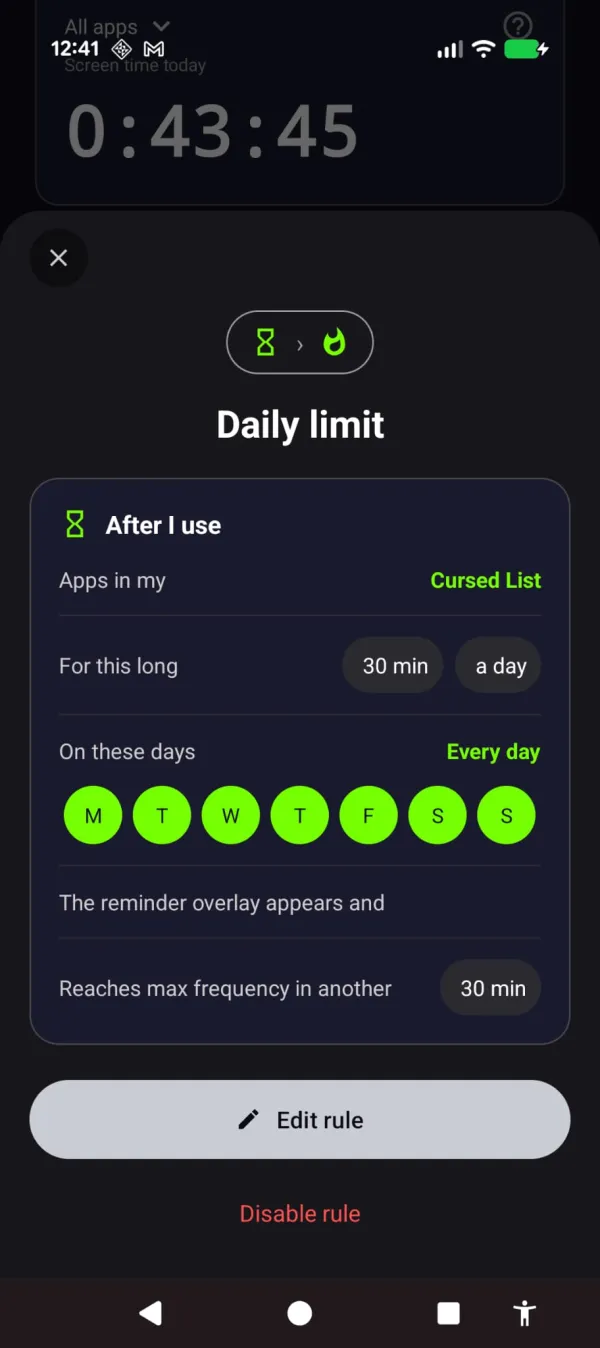
Visual reminders that grow with usage. Your phone is designed to put you in a trance, and a timer can’t reach you once you’re in it. Arise replaces the timer with a visual reminder over your life-stealing apps that grows stronger the longer you stay. No notification to dismiss. After a grace period, flames, cracking glass, and crawling bugs creep in from the edges of your screen, or frost slowly spreads across it. The longer you scroll, the stronger it grows. Put the phone down and it fades.
This handles the core problem with limits: there’s no decision point. A timer asks “do you want to stop?” The reminder doesn’t ask anything. It just breaks the trance. Your brain’s response to a screen covered in crawling bugs is different from its response to a polite notification. One you dismiss. The other you feel.
The session-based tracking matters here too. Screen time limits are binary: you hit the limit or you don’t. Arise’s reminder is continuous. At 10 minutes past grace, it’s subtle. At 30 minutes, it’s noticeable. At 60 minutes, it’s hard to ignore. The reminder grows gradually instead of a wall coming down all at once. That gradual pressure is closer to how behavior change actually works.
You still set a limit. But crossing it doesn’t pop a box you tap away — a reminder creeps in over the app instead.
If you still want a limit
If you want to try limits anyway (some people genuinely do respond to them), here’s how to make them less useless:
- Use AppBlock with Strict Mode instead of Digital Wellbeing. At least you can’t dismiss it mid-session.
- Set the limit lower than you think you need. If you want 30 minutes on Instagram, set 15. You’ll fight it, but you’ll end up at 20-25 instead of 60.
- Combine limits with environment changes. A 30-minute timer plus “phone charges in the kitchen” is more effective than either alone.
- Accept that you’ll bypass the limit sometimes. The goal isn’t perfect compliance. It’s reduced average usage over weeks.
Or stop relying on a box you can tap away, and try something that doesn’t ask you to make a decision at your worst moment. Arise is free to use on Android and iPhone (on iPhone it blocks apps; the visual reminders are Android only). Premium themes, focus mode and Child Lock come with a monthly, yearly or lifetime plan. Just a reminder that grows the longer you stay and pulls you back to the life outside the screen.
The best screen time limit is the one you don’t need to enforce. Because you won’t. For the actual playbook — what works, what doesn’t, ranked by evidence — read how to reduce screen time next.
Take back your life from your phone
Your phone is built to keep you scrolling. Arise breaks the trance with visual reminders that grow the longer you stay, and it can lock an app when you want a hard stop.
Get Arise on Google Play