ADHD Productivity Apps That Don't Fight Your Brain
Most productivity apps are built for neurotypical brains. Set a timer. Make a to-do list. Block distracting apps. Focus.
If you have ADHD, you’ve tried all of these. The timer goes off and you forgot what you were working on. The to-do list has 47 items and you can’t start any of them. The app blocker gets disabled the first time you need a “quick break.” The word “focus” starts to feel like a personal insult.
Here are the productivity apps that work with ADHD neurology instead of against it, including tools for the phone addiction problem that ADHD makes uniquely hard to solve.
Body doubling apps
Body doubling — working alongside another person — is one of the most effective ADHD productivity strategies. The social presence of someone else working provides external accountability without external control. Your brain borrows focus from the shared context.
Focusmate and similar virtual co-working apps match you with a stranger for 25 or 50 minute work sessions over video. You state what you’ll work on. They state what they’ll work on. You both work. The mutual accountability works on ADHD brains the way caffeine works on neurotypicals — you feel it.
Body doubling works because it doesn’t demand executive function. You don’t have to decide to keep focusing. The social pressure does it for you. When executive function is the bottleneck, that’s the whole game.
ADHD-specific task managers
Structured and Tiimo are task managers designed around ADHD neurology. Visual timelines instead of text lists. Color-coded blocks. Gentle reminders that don’t feel like nagging. Flexible scheduling that accommodates the ADHD reality of “I know what I should do but I can’t start.”
Standard to-do apps (Todoist, Things, Any.do) fail for ADHD because a long text list triggers paralysis, not action. ADHD brains need visual structure, time-blocked planning, and permission to deviate without guilt.
Friction apps (ADHD-appropriate)
One Sec works better for ADHD than hard blockers. The breathing exercise doesn’t block access (which triggers oppositional fixation). It interrupts the impulse with a sensory task. For some ADHD brains, 5 seconds of conscious breathing is enough to disengage the autopilot that opens TikTok.
ScreenZen (free) adds a countdown and open limit. The daily open limit is useful for ADHD specifically because it makes the number visible. Seeing “you’ve opened Instagram 12 times today” creates awareness that the 13th time can react to.
Hard blockers like AppBlock tend to backfire for ADHD. The block becomes a puzzle. Finding the workaround is more stimulating than the work you should be doing. The ADHD brain fixates on the blocked thing, making it more distracting, not less.
Visual reminders for ADHD
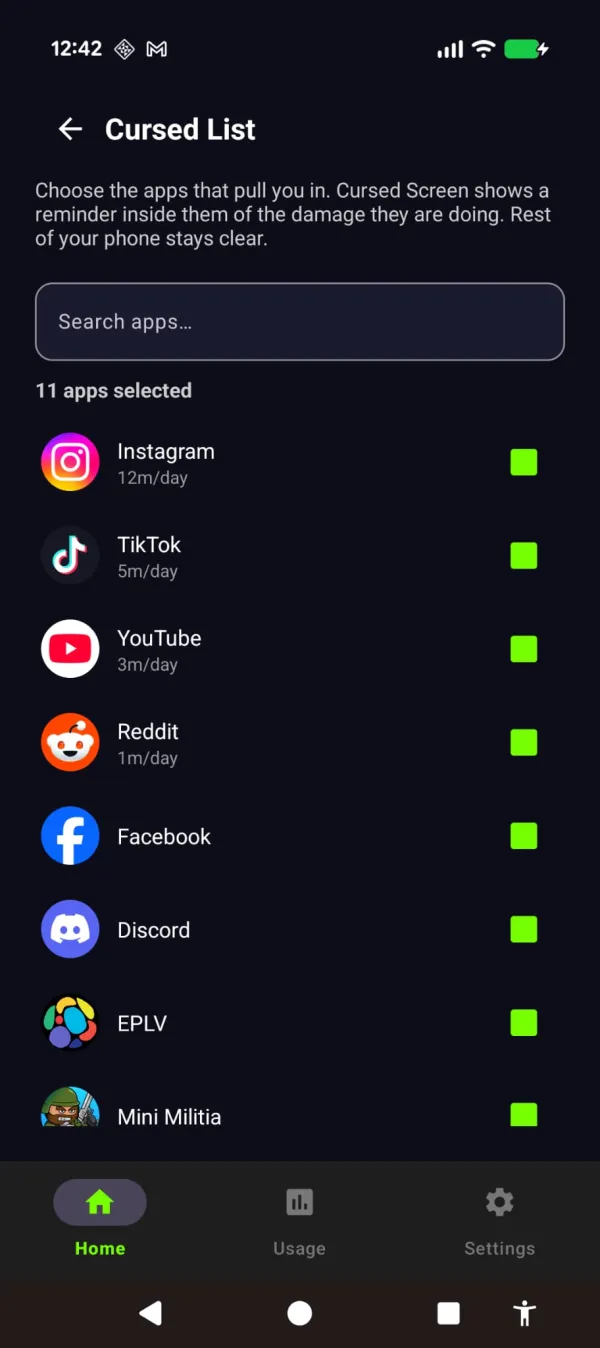
Arise approaches ADHD phone addiction differently. On Android, it doesn’t block anything unless you ask it to (nothing to fixate on bypassing). It doesn’t add a cognitive task before opening apps (ADHD rushes through those). Your phone is designed to hook you, and the feed puts you in a trance that an ADHD brain slips into faster than most. Arise breaks the trance with visual reminders. You pick your life-stealing apps and websites and get a grace period to use them guilt-free. After that, a reminder appears over them and grows stronger the longer you stay. Put the phone down and it fades away.
You pick your life-stealing apps. Everything else stays clean.
Why this matters for ADHD specifically:
Sensory, not cognitive. The reminder registers automatically. You don’t need executive function to notice bugs creeping across your feed. A timer notification requires you to read it, evaluate it, and make a decision. A visual reminder lands before you’ve had to think about it. ADHD impairs executive function. It doesn’t impair instinctive sensory responses.
No adaptation to bypass. ADHD brains are experts at routinizing and ignoring cognitive interventions (timers, prompts, reminders). A visual reminder that keeps growing the longer you stay is harder to routinize because it’s variable and visceral. Minute 10 doesn’t look like minute 40. Newer themes fill more of the screen as the minutes pass — frost spreading over the glass, water rising, thorny brambles closing in — so there’s no fixed picture for your brain to learn to tune out.
Session-based tracking matches ADHD usage. ADHD phone use comes in intense bursts, not steady all-day use. A daily tracker penalizes the pattern. Session-based tracking with 3:1 recovery matches it: burst, put down, burst again. Each put-down lets the reminder fade.
Settings for ADHD:
- Grace period: 5 minutes (hyperfocus kicks in fast)
- Tracking: session (matches the burst-and-put-down pattern)
- Theme: Hell or Creepy Crawlies (strong sensory signals cut through ADHD distraction better than subtle ones)
The stack for ADHD
No single app solves ADHD phone addiction. The effective stack:
- Body doubling app for focused work sessions (external accountability)
- ADHD task manager for structuring the day (visual, not text-based)
- Friction app for casual phone checks (interrupt the autopilot)
- Visual reminders for the extended scrolls that survive everything else
Arise is free to use on Android and iPhone (on iPhone it blocks apps; the visual reminders are Android only). Premium themes, focus mode and Child Lock come with a monthly, yearly or lifetime plan. It’s the layer that works when your executive function is offline — which, if you have ADHD, is most of the time. Your brain doesn’t need to decide to stop scrolling. The reminder breaks the trance and pulls you back to the life outside the screen. You can keep scrolling. But you won’t want to.
Take back your life from your phone
Your phone is built to keep you scrolling. Arise breaks the trance with visual reminders that grow the longer you stay, and it can lock an app when you want a hard stop.
Get Arise on Google Play